Friday, 20 January 2017

HOW TO REMOVE MTK LOGGER ON CPN3 & lite

STEPS TO REMOVE 'MTK LOGGER' AND " =>factory"  DURING EACH BOOT


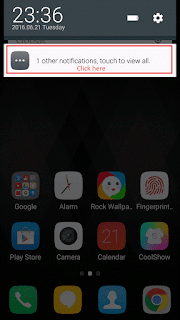
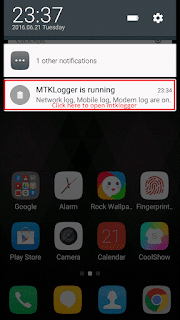
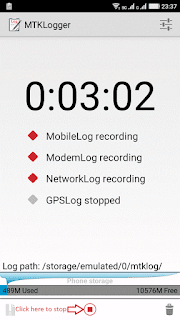
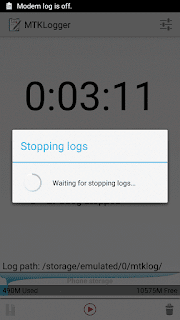
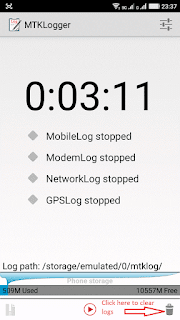
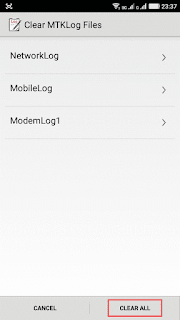
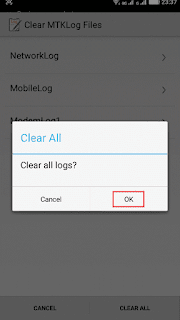
step 1 : Disable and clear mtklogger


step 2: 
a)    open dialpad and dial *#9527*# and then a menu will appear , click on DM .
b)    Type RD personnal password : 54321.
c)    If DM flag value is"1" choose "ok" , then DM mark will become "0".
d)    If DM colour turns green from red then choose "close".
e)    Select "sure".
f)    Reboot Now "=>factory" and "MTK logger" will be gone now


Wednesday, 4 January 2017

How to flash android 6.0. MarshMallow on coolpad note 3 and lite


Coolpad note 3 , being one of the best budget phones of 2015 , continue to retain its position on list with android 6.0 . coolpad officially released android 6.0 for note 3 and lite , but can only be flashed through sp flash tool or twrp recovery . There's no point of expecting OTA updates from coolpad anymore as they had  officially announced that , OTA updates can only be recieved if user had already updated to android 6.0

HOW TO FLASH ANDROID 6.0 ON CPN3 AND CPN3  lite THROUGH SP FLASHTOOL

FLASHING WOULD RESULT IN LOSE OF ALL YOUR DATA : KINDLY BACKUP EVERYTHING BEFORE YOU PROCEED

Things to be downloaded

1) SP flash tool is an application which is mainly help you to flash Stock ROM, Custom recovery and fixing in some extreme cases ( firmware update, Flash recovery, unbrick bricked android device etc.).  SmartPhone FlashTool is working with MediaTek Android smartphones (MTK based) You can Download SPFlashTool from our download section. You need to load scatter file for MTK based device for functioning.


download  : sp flashtool


2) DOWNLOAD AND  INSTALL MTK DRIVERS FOR WINDOWS 10 

1:  Download the latest version from: MTK driver and install.

2:  unzip it.

3:  for win 10 working on 64 bit os , have to follow an extra step than win 10 with 32 bit os , as these drivers are unsigned , so for 32 bit users can skip this step
for win 10 64 bit system  : goto settings >  update and security >  recovery> restart now , when system boots into recovery mode select  trouble shoot> advanced option> start up settings and click on rerstart. when startup settings page appear  press number '7 ' on keyboard.
It takes some time to restart."

4: once when restart , right click on windows button and select  'device manager'  and allow any prompts message like " do you want to make this application to make changes to the pc".
on device manager menu ,click on the name of pc and then click on  ' action button'  on the drop down menu select   'Add legacy hardware'   then click next and select ' install the softrware manually' then click 'next' . 
click on 'show all devices' select 'hard disk' browse the mtk drivers that we have downloaded , select either 64 bit or 32 bit as per your os , press open and then ok. select 'MTK usb port' then click next and then click next one more. then you can see a prompt saying "windows cant verify the publisher of drivers software" , select 'uninstall this driver software anyway' , when driver get installed click finish.

5: for error correction
on device manager , double click on 'ports(COM & LPT)' and right click on ' MTK usb port (COM3)'
and select uninstall and click ok.
now you have successfully installed MTK drivers on your win10 ;)


3) DOWNLOAD AND EXTRACT ANDROID 6.O FIRMWARE

for coolpad note 3 :android 6.0 v22 for cpn3
for ccolpad note 3 lite :android 6.0 v10 for cpn3 lite


4) DOWNLOAD AND INSTALL ADB AND FASTBOOT
    LINK : adb and fastboot


steps to install android 6.0 on cpn3 and lite

1> : open sp flashtool folder and run sp flashtool.exe ,  select scatter loading and browse the firmware folder and select android scatter file , then sp flashtool loads all files .


2>: switch off your phone and keep it ready.
3>: click on 'download' on sp flashtool and immediately connects the phone to the pc or laptop. once connected you can see a yellow bar showing the progress of flashing.

4>: flashing would take almost 3-10 minutes depending up on your computer speed , and once completed a green tick will appear on sp flashtool. 

5>: unplug your usb cable and switch on your phone , it would take approx 5 minutes to boot up.


now you have successfully flashed android 6.0 on your cpn3 or cpn3lite.

FOR MORE INFORMATION AND VIDEOS VISIT COOLPAD FORUM


Flashing may lead to loss of data and damaged hardware if not done properly. Reading tutorials are highly suggested.
Factory Reset in Recovery Mode after flashed to 6.0 is suggested but not complusory (It can prevent some minor OS update bugs).


Sunday, 13 March 2016

Lost your mobile

If u lose your mobile in India,  you can get it back.
Got an interesting fact to share..

Nowadays almost everyone  of us
carry  latest expensive
Mobile devices which always
Fears that it may be stolen.

Each mobile carries a unique
IMEI no. i.e. International Mobile Equipment Identity No which
can be used to track your
mobile anywhere in the world.

This is how it works!!

1. Dial *#06# from your mobile.

2. Your mobile shows a unique
    15 digit.

3. Note down this no anywhere
     But except in your mobile as
     this is the Number which will
     help trace your mobile in
     Case of a theft.

4. Once stolen you just have to
     E-mail this 15 digit IMEI No.
     to cop@vsnl.net with detail
     Mentioned below.
  
Your name:____________________
Address:______________________
Phone model:_________________
Make:_________________________
Last used No.:_________________
E-mail for communication:_____
Missed date:___________________
IMEI No :_______________________

      5. No need to go to the
          police.

      6. Your Mobile will be traced
           within next 24 hrs via a
           complex system of GPRS
          and internet, You will find
          where your hand set is
          being operated even in
          case your No. is being
          changed.

Coolpad Note3 Fonts for lollipop

Coolpad note 3  is one of the most specs packed phone under sub 10k category, with 3 gb ram, mali T720MP3 GPU and Octacore 1.3 ghz Cpu coolpad note 3 is cappable of every customization and cool ui support every functionable customization including fonts , notification panel etc.


Being a chinese based company coolpad doea not provide any support for downloading themes and fonts in india unlike in china which is possible. so am posting some links to download themes and fonts for coolpad note 3


DETAILED STEPS TO CHANGE FONTS IN COOLPAD NOTE 3

First of all open file browser on your coolpad note 3.


Then go to SD card option and open that.There you will see a Coolpad folder.


Open that, then open coolshow inside Coolpad foder.


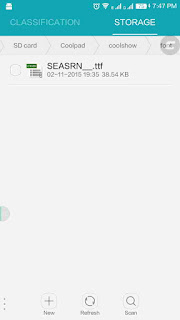
Now you have to create one "font" folder. Click on + sign above New and name that "font".


 That’s it, Half of the work finished. Quite simple na

Now download your favourite fonts in ttf format and paste that on above "font" folder.


Now open Coolshow, then Fonts style and apply your font.


Screenshots of SeasideRed font


Links to download fonts (.ttf) for coolpad note 3 


For coolpad note 3 themes : 


Thanks 

Saturday, 12 March 2016

Coolpad Note 3 themes download


Coolpad note 3  is one of the most specs packed phone under sub 10k category, with 3 gb ram, mali T720MP3 GPU and Octacore 1.3 ghz Cpu coolpad note 3 is cappable of every customization and cool ui support every functionable customization including fonts , notification panel etc.

Being a chinese based company coolpad doea not provide any support for downloading themes and fonts in india unlike in china which is possible. so am posting some links to download themes and fonts for coolpad note 3.


DETAILED STEPS TO APPLY THEME ON COOLPAD NOTE 

This tutorial is in continuation to the tutorial posted on "How to change font on your coolpad note 3" Through the help of this tutorial you will be able to add more themes in your theme list of  your Coolpad Note 3 font without any root requirement.Now Lets start:

First of all open file browser on your coolpad note 3.


Then go to SD card option and open that.There you will see a Coolpad folder.


Open that, then open coolshow inside Coolpad foder.


Now you have to create one "theme" folder. Click on + sign above New and name that "theme".


COOLPAD NOTE 3 THEMES


STEPS TO DOWNLOAD COOLPAD NOTE 3 FONTS


Coolpad note 3 fonts


Thanks

Android N what to expect

Google has surprised everyone with the spontaneous announcement of the Android N Developer Preview. This early version of the next major Android software update, due to be released later in the year, gives us a good indication of where Android is heading and what we can expect in the full release. How does it look so far? Find out everything you need to know about Android N below.  


Android N Developer Preview: what is it?

Available on some Nexus devices (Nexus 6P, Nexus 5X, Nexus 6, Pixel C, Nexus 9 and Nexus Player), the Android N Developer Preview is a test version of the new Android software, primarily intended for developers. Like previous Developer Preview versions (such as Android M, which later became Android Marshmallow), the first version of this software does not contain all the new features of the next version of Android, but only parts. 

Google said that the final version of Android N will be sent to all manufacturers this summ


Android N Developer Preview: what's new?
Menu between the system settings

A hamburger menu button (the icon with three lines) has now been embedded into the system settings. When a user is in the Bluetooth menu, for example, they can quickly jump to the other system options using this left side menu. This menu is already a standard in other Google applications.


Reply to messages from the notifications bar

Of the new additions, this is possibly the feature which most resembles Apple iOS. Messages can now be answered from the notification itself. With this, the user will not need to leave an app to answer a message or even unlock their phone.


Multi-window mode

As we saw in the Android M developer preview, Google has been working hard to bring a native and efficient multitasking system to Android. Although the function was eventually omitted from Android 6.0 Marshmallow, with Android N, Google now seems ready to make the leap.

The image below shows the multi-window feature, which works on both tablets and phones and mirrors what you can currently get on some Samsung and LG devices.

Like most major platform changes, developers will have to opt in for the split screen mode to allow their apps to run smoothly. This can be done by adding a new attribute called: resizableActivity.


This attribute allows developers to specify the minimum size the app can be resized to and to determine whether resizing will be immediate or the application needs to restart with the required dimensions.


New Notifications panel

The notification panel has been completely redesigned, perfectly aligning with what we had seen in earlier leaks. Icons above the notification shade are now more prominent, and on the far right there is a dropdown toggle to expand the panel.
It is now possible to respond to messages directly from within a notification, a feature that uses the same RemoteInput API that Android Wear makes use of.


Notifications can now also be "stacked", optimizing the space in the notification area.

Developers can choose to stack notifications from the same application in a single line. These can then be expanded using the expansion button or a two-fingered gesture.
Below you can see a video one of our German editors, Eric Herrmann, made:


Enhanced Doze mode

The energy saving mode Doze has been improved in Android N. Previously, the feature had only worked when the phone had remained completely undisturbed for a long time, i.e. when you're sleeping, but now Google says Doze will also save battery any time the screen is turned off. We will have to test the new system more thoroughly to find out what impact it has on energy consumption.


A system like this that comes into effect every time the phone's display turns off might not be something everyone is keen on, but we'll have to see how it works in practice. It is possible that a less extreme version of Doze mode, one that monitors the energy consumption of apps without impairing the usability and notifications, might be worked out.


Android Beta Program

Another new addition from Google is a way to receive preview builds and updates over-the-air, avoiding the need for flashing factory images. Anyone with a compatible device is able to sign up for the Android Beta Program and receive these preview builds automatically.

These are just some of the new features of Android N, and many other improvements are yet to be implemented or previewed. Some features we may even have to wait for the final build to find out about. For now the app drawer still remains, although rumors suggest that it may disappear in the future.


Svelte design

Google says it has been hard at work on Project Svelte, a set of tweaks that make Android more able to run on aging and less-powerful devices. This project originates from Android KitKat but we don't know much about it yet. More details should follow with the full release of Android N.


How to download Android N

If you are a developer or just want to test the preview version of Android N, you can download images of the new OS directly from Google. Remember that this version is unstable and contains many bugs. The update can be downloaded via this link.
Note: Only the Nexus line of devices can receive the preview build of Android N. Below you can see what the Nexus models support the OS:

As usual, the Developer Preview version does not have a final name, it is still only "Android N". However, Hiroshi Lockheimer, the head of Android, is stoking the curiosity of Android lovers, making jokes about the possible "Android Nutella", but nothing is for certain at this point. Google’s I/O 2016 conference, where we originally expected this developer build to be released, promises more news on Android N.


Android N name

Android N is purely a codename right now, so what will the new version be called? There are already a lot of possibilities, but the major front-runners are Android Nutella and Android Nougat. If previous years are any indicator, Google will share the official Android N name in the weeks before the release of the 2016 Nexus devices.

In December 2015, Google CEO Sundar Pichai, speaking at a college in Delhi, suggested that Google is considering holding a poll to allow users to decide the official name of Android N. The comment came after Pichai was asked why there has not been an Android version named after an Indian desert. He commented that he would ask his mother for suggestions, and an online poll might make it a reality.


Android N release date

The Android N Developer Preview is already here and this will be followed by monthly(ish) updates until the final version. That final version will likely come around Nexus time – late September or early October – with Android N availability for other manufacturers and devices in the six or so months to follow.

Google tends to announce its major yearly Android updates at Google I/O – its annual developer conference – in May, so it's very likely we'll receive some more information about the Android N developer preview then.


Android N: what we'd like to see

Below are some features not yet seen in the Android N preview which we would like to be implemented into the final build. 


Android N user-facing controls

Android Marshmallow delivered a lot of useful – if not exactly sexy – features, including granular app permissions, app standby whitelist (for exceptions to battery optimization), app linking preferences, System UI Tuner (for simple changes to the interface and RAM management.

Android N will likely continue to add more user-facing controls to stock Android. Some of the Android N features we'd like to see are more custom launcher features, such as the ability to change the number of rows and columns of icons in the app drawer, vertical or horizontal app drawer layout, user-defined gesture controls and a customizable power off menu. These features may well make it to prime time via updates to the currently hidden System UI Tuner.


Android N password manager

In Marshmallow, the Smart Lock for Passwords feature is hidden down the bottom of the Google settings. It's a fledgling password manager for apps that will basically set back to exactly where you were if you uninstall and then re-install an app.

Smart Lock for Passwords automatically signs you into apps, and Marshmallow's automatic app backup feature re-loads all of your app data and progress. It's a nice idea, but it doesn't work with many apps yet. We hope the Android N release delivers a fully functional and widely supported password manager.


Android N permissions manager

As we mentioned, Android Marshmallow already has granular app permissions – meaning that you can select individual permissions to grant or deny a particular app and change them at any time – but the feature is still a little confusing. The feature actually debuted back in the hidden AppOps in Android 4.3 Jelly Bean but was quickly removed, only to resurface in Android 6.0.
So we'd like to see an even better permission manager in Android N, one that makes the process more intuitive and allows better control over app permissions while making the whole process a lot more transparent. Right now you have to dig around in the apps settings of Marshmallow to even find and make sense of the current state of your app permissions.
By the time Android N rolls around, we also expect a lot more apps to support API 23, which ensures that granular app permissions do not significantly affect an app's functionality. It's early days for app permissions, but we think Android N will be the release where things get mature.


Android N default applications

Android Marshmallow includes an app linking feature that allows you to define which apps to use to open particular links with. In the same area, you can tell the Android system which apps you want to use as the default for a few functions, such as the dialer, browser, SMS app and voice input.
Google is slowly expanding the default app functionality introduced back in KitKat whenHangouts was set as the default SMS app. Now we have four default apps options, but we're hoping that Android N will introduce a default app picker for any number of your system needs: email, camera, file manager, fitness, weather, contacts, maps and more.


Android N theme engine

If you've seen the OnePlus 2 you'll know just how easily the stock Android interface can be themed, even on a very superficial level. OnePlus' OxygenOS looks a lot like stock Android but allows you to choose custom accent colors for the interface (that's the color of switches and toggles and so on). This would be a very simple but welcome addition to Android N.

We'd also expect to see a Dark Mode in Android N, but we wouldn't be surprised if it reappeared in an upcoming Marshmallow update, long before Android N. It goes without saying that there's no limit to how far Google could take a stock Android theme engine if it felt so inclined. After all, Android has been borrowing features fromalternate launchers and custom ROMs for a while now.


Android N system update independence

This would be the holy grail of Android N updates: independent system updates from Google that are totally separate from any subsequent updates imposed by your manufacturer or carrier. These last two are the reasons why Android updates take so long for non-Nexus devices.

If Google could update the core functionality of Android, independent of any interface and software feature changes added later by manufacturers and carriers, we could suddenly be looking at Nexus-speed Android updates for everyone, just like with iOS, and the end of Android fragmentation.

Add-ons from carriers and OEMs could simply come at a later date, but the core functionality would be near instantaneous. How this could all work is a bit of a mystery, but there has to be a team at Android already looking at it how it could make it work.


We saw Smart App Updates introduced back in mid-2012, whereby app updates don't install the entire app again but only the new parts unavailable in your current version. We've also seen manufacturers like HTC pushing software features and apps to the Play Store to cut down on the weight of system updates.

By disentangling those features that don't need to be tied up in major Android updates, patches and bug fixes can be pushed out a lot faster and the heavy lifting when major updates arrive will be lessened. If Google could manage this on an Android-wide scale (which is, admittedly, not very likely) it would be the best news to come out of Android in a very long time.

Thanks
Coolpad Note 3 user experience

A Review on Coolpad Dazen Note 3

Discover more about Coolpad Note 3 : why you should try it or buy it 😉.

Unboxing:

➻ Handset
➻ Earphones(plugin type similar to yureka plus earphones)
➻ USB cable(good quality, similar to Samsung USB cables)
➻ Travel adaptor( its a 2A adaptor that means this handset has fast charging and I was really surprised to see this type of charger in this budget phone)
➻ Battery is built in and non removable
➻ User guide (no screen protector,quite disappointing😔)

(Reviewing after 1 day usage)

Display :(6/10)

➻ Good but not the best
➻ Its not sharp and not bad either, but asus zenfone display is better than this
➻ Have a LED indicator

Sound:(8/10)

➻ Speaker output is good, No issues with it.
➻ Earphone output is also good, it supports all the earphones. (I tested my Samsung earphone. It works well the pause and play button works and even the volume control button of the earphone works whereas it doesn't work on Asus Zenfone.)

Camera:(7/10)

➻ Gives very good photos under day light.
➻ In nights only closeup shots appear good.
➻ Images are soft and not really sharp.
➻ Front cam clicks good selfies (Contain beautifying features 😍).

Few clicks :


Battety:(10/10)

➻ Its 3000 mah battery.
➻ Battery backup is really impressive and even the charge timing.
➻ It charges from 5% to 100% in 1 hour and 40 minutes

SAR value:

➻ SAR value of this phone is 0.249 (head) & 0.425(body).
➻ It is completely safe for those who talk for hours in phone.

Software :

➻ It runs on 5.1 lollipop.
➻ Very less bloat-wares installed and almost 2 GB of ram free even on running 8 to 10 apps in the background.

Hardware:

➻ I'm a not a geek and I don't play heavy games but played spider-man and asphalt 8(medium graphics).But it doesn't heat up much like the yureka plus and mi phones

Sim card slots:

➻ It has 2 separate sim card slots and a memory card slot.
➻ You can use 2 4g sims amd a memory card at the same time.
➻ Both the sim support 4G (tested it with airtel 4G).

Call quality :(9/10)

➻ Call quality is good.
➻ No issues and it has 2 microphones.
➻ 4g and 3 g signal reception is also good.
➻ Inbuilt recording option.

Fingerprint sensor:(10/10)

➻ Its far far better than one plus two finger print sensor.
➻ It detects your finger at any degree and even the sweaty fingers.
➻ It unlocks the device instantly in less than a sec or 0.5 sec.
➻ If u love this new technology and if u r buying the phone for this feature you will never regret.

Conclusion

Cons:
➻ Display
➻ Look(not a premium look...but Better than k3 note....)
➻ Camera


Pros:
➻ Battery backup
➻ Battery charging time and charger (fast charging)
➻ Fingerprint sensor (the true strength of this handset)
➻ Some useful pre-installed software's like fingerprint lock for apps, multi-user option and c floating button which is useful for one handed operation in 5.5 inch device.
  

Specification:


NETWORKTechnologyGSM / HSPA / LTE
LAUNCHAnnounced2015, October
StatusAvailable. Released 2015, October
BODYDimensions151 x 77 x 9.3 mm (5.94 x 3.03 x 0.37 in)
Weight-
SIMDual SIM
DISPLAYTypeIPS LCD capacitive touchscreen, 16M colours
Size5.5 inches (~71.7% screen-to-body ratio)
Resolution720 x 1280 pixels (~267 ppi pixel density)
Multi-touchYes
PLATFORMOSAndroid OS, v5.1 (Lollipop)
Chip-setMediatek MT6753
CPUOcta-core 1.3 GHz Cortex-A53
GPUMali-T720MP3
MEMORYCard slotmicroSD, up to 64 GB (dedicated slot)
Internal16 GB, 3 GB RAM
CAMERAPrimary13 MP, f/2.0, auto-focus, LED flash
FeaturesGeo-tagging, touch focus, face detection, HDR, panorama
Video1080p@30fps
Secondary5 MP
SOUNDAlert typesVibration; MP3, WAV ringtones
LoudspeakerYes
3.5mm jackYes
- Active noise cancellation with dedicated mic
COMMSWLANWi-Fi 802.11 b/g/n, hotspot
Bluetoothv4.0, A2DP
GPSYes, with A-GPS
RadioFM radio
USBmicroUSB v2.0
FEATURESSensorsFingerprint (rear-mounted), accelerometer, proximity
MessagingSMS(threaded view), MMS, Email, Push Mail, IM
BrowserHTML5
JavaNo
- MP4/H.264 player
- MP3/eAAC+/WAV player
- Document viewer
- Photo/video editor
BATTERYNon-removable Li-Ion 3000 mAh battery
MISCColorsWhite
Price group03-Oct